How to Download Pinterest Videos: Complete Step-by-Step Guide
Wondering how to download Pinterest videos directly to your device? This detailed tutorial explains the exact procedure for saving high-quality MP4 clips from Pinterest on iPhone, iPad, Android, Windows PCs, and Mac computers.
Quick Answer: How to Download a Pinterest Video in 3 Steps
- Copy the link: Open the video Pin on Pinterest and tap Share → Copy Link.
- Paste into Save-Pins: Navigate to Save-Pins.com and paste the link into the search bar.
- Save the MP4: Preview the video clip, select your desired resolution (e.g. 1080p or 720p HD), and click Download MP4.
1. Visual 3-Step Walkthrough with Screenshots
First, understand that downloading Pinterest videos requires no special software or account credentials. Because Save-Pins operates entirely online in your web browser, the process consists of three straightforward steps illustrated below.
1Step 1: Copy the Video Pin Link from Pinterest
Initially, locate the public video Pin you want to save inside the Pinterest app or on your desktop browser. Next, tap the Share icon (or three dots) and click Copy link. Alternatively, copy the complete URL directly from your browser's address bar.
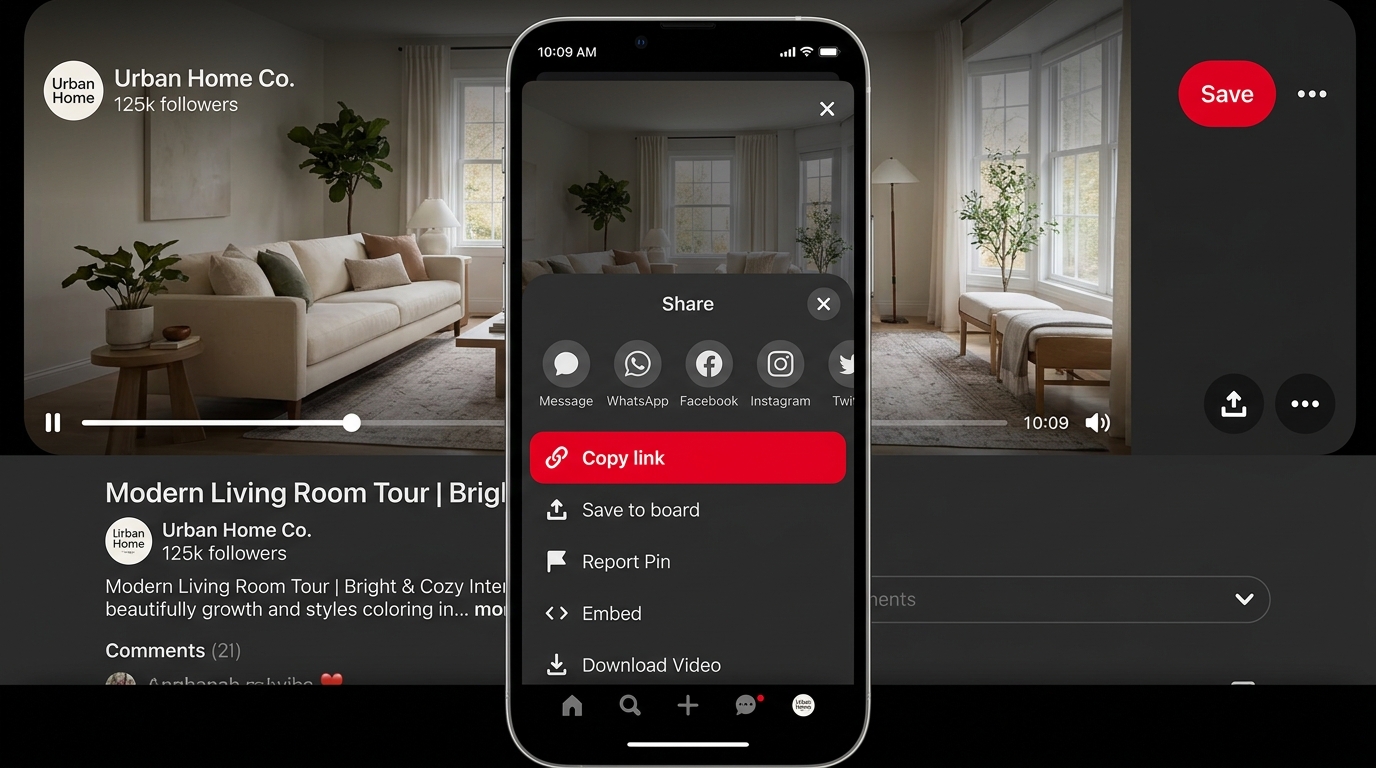
Figure 1: Tapping the Share button on a Pinterest video Pin and choosing "Copy link".
2Step 2: Paste the URL into Save-Pins
Subsequently, open your web browser and navigate to Save-Pins. Paste the copied Pinterest link into the clean search field. You can also press the convenient Paste from clipboard button. Finally, click the red Download button to begin extraction.
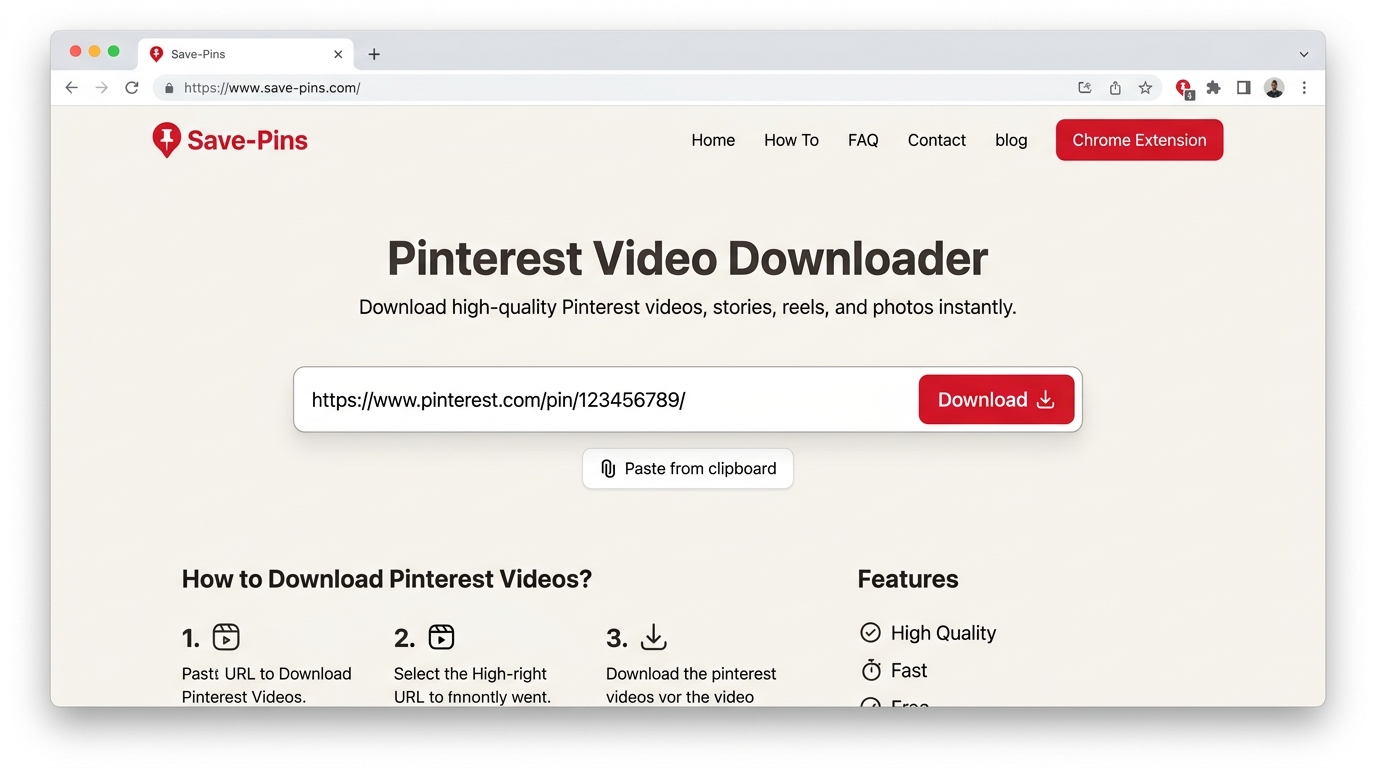
Figure 2: Inserting the Pinterest URL into Save-Pins and clicking the Download button.
3Step 3: Preview the Video and Download Your MP4
Within a few seconds, our engine verifies the public stream and presents the video player preview. Consequently, you can play the clip to confirm the audio and video before saving. Afterward, select your desired resolution (such as 1080p Full HD or 720p HD) and tap Download MP4.
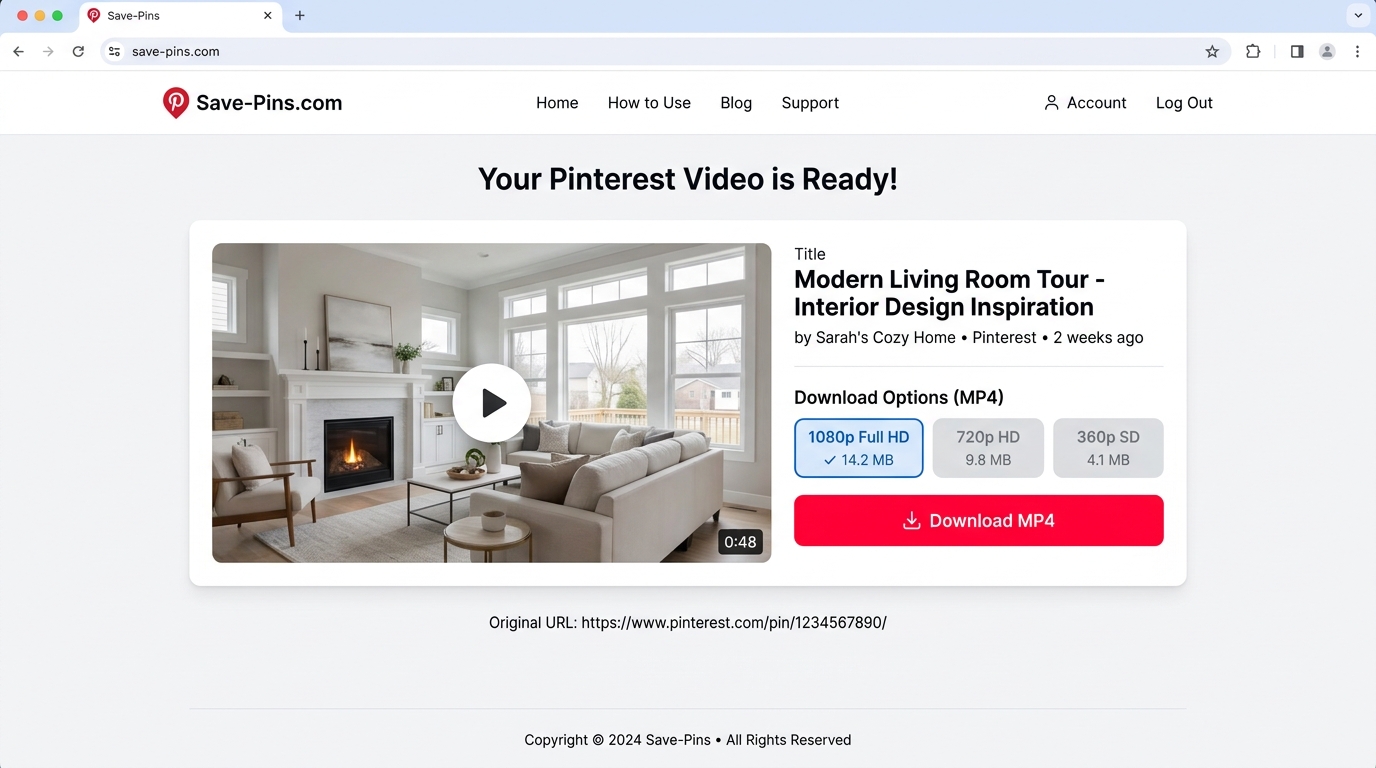
Figure 3: Previewing the extracted media on Save-Pins and selecting an MP4 download quality.
2. How to Download Pinterest Videos on Mobile Devices
Mobile phones account for the majority of Pinterest traffic. Fortunately, learning how to download Pinterest videos on iPhone and Android is remarkably simple using mobile Safari or Chrome.
Downloading Pinterest Videos on iPhone & iPad (iOS)
Follow these platform-specific steps on Apple iOS devices:
- Launch the Pinterest iOS app and find the video Pin.
- Tap the Share button and select Copy Link.
- Open Safari and navigate to Save-Pins.com.
- Paste the URL into the input field and click Download.
- Preview the video, then tap Download MP4.
- When Safari displays a prompt asking "Do you want to download this file?", tap Download.
- To move the video to your Photos Camera Roll: tap the blue download arrow in Safari's address bar → open the file in the Files app → tap the Share icon → select Save Video.
Downloading Pinterest Videos on Android Phones & Tablets
Follow these steps on Samsung Galaxy, Google Pixel, or any Android device:
- Open the Pinterest app and navigate to your chosen video Pin.
- Tap the Share icon and select Copy Link.
- Open Google Chrome (or your default mobile browser) and visit Save-Pins.com.
- Paste the link and tap the red Download button.
- Confirm playback in the preview window and select your quality option.
- Tap Download Video to store the MP4 in your device memory.
- Your downloaded MP4 appears immediately in your system Downloads folder and can be viewed inside Google Photos or the default Gallery app.
3. How to Download Pinterest Videos on Desktop (PC, Mac & Chromebook)
If you are designing mood boards or archiving content on a computer, downloading on desktop is even faster because copying URLs requires only a keystroke.
Windows 10 & 11
Copy the Pin link from Edge or Chrome, paste it into Save-Pins, and save the MP4 directly to your PC.
C:\Users\Name\DownloadsApple Mac & MacBook
Use Safari or Chrome on macOS. Files download as native MP4s, ready for QuickTime and Final Cut.
Finder → DownloadsGoogle Chromebook
Chrome OS handles downloads seamlessly without supplementary extensions or Play Store apps.
Files App → Downloads4. Which Pinterest Links Are Supported?
In order for Save-Pins to extract a video stream, you must supply a link pointing directly to an individual public Pin. Review this comparison table before attempting extraction:
| ✓ Supported Pinterest Links | ✗ Unsupported Links |
|---|---|
Standard public Pin URLs (pinterest.com/pin/...) | Entire Pinterest boards (pinterest.com/username/board) |
Mobile app short links (pin.it/...) | User profile addresses (pinterest.com/username) |
| Public Idea Pins containing video streams | Private or secret board Pins |
| Publicly viewable animated GIF Pins | Deleted or expired Pin URLs |
Pro Tip: Always open the individual Pin first to ensure you copy the unique post URL rather than a broad Pinterest category feed.
5. Pinterest Video Resolution, Format, and Watermarks
When learning how to download Pinterest videos, understanding the output quality is vital. Save-Pins extracts the exact video stream delivered by Pinterest servers without re-compressing or artificially degrading the media.
Standard MP4 Format
MP4 is universal, meaning your downloaded files open smoothly on any media player without third-party codecs.
Source Resolution
If the creator published the video in 1080p Full HD or 720p HD, Save-Pins lets you save that authentic resolution.
Watermark Integrity
We never add our own branding or remove creator attribution marks. Original watermarks remain intact.
6. Troubleshooting: Why Won't My Pinterest Video Download?
If an extraction attempt fails, review these four common causes and remedies:
1. The Pin features static images instead of a video
Many aesthetic Pins are photographs rather than video clips. Because photo Pins lack a video stream, our downloader cannot extract an MP4. Simply right-click or long-press the photo to save the image directly in your browser.
2. The Pin is set to private or requires an account login
Save-Pins adheres strictly to digital privacy boundaries. If a creator restricts a Pin to secret boards or requires authentication, our server will not bypass those restrictions.
3. You submitted a board or profile link instead of a specific Pin
Ensure the link points to a single post (e.g. pinterest.com/pin/123456789/). Click into the individual Pin before copying its URL.
4. The short link redirected to an expired session
If an older pin.it link fails, open it once in your browser to resolve the permanent destination URL, then copy that fresh address into Save-Pins.
7. Frequently Asked Questions
Is it free to download Pinterest videos with Save-Pins?
Yes, Save-Pins is 100% free with no hidden fees, subscriptions, or download quotas. You can process publicly accessible Pins as often as you need.
How do I save the video to my iPhone camera roll?
After downloading the file in Safari, tap the Downloads button in the browser bar, open the video in the Files app, tap the Share icon at the bottom left, and tap Save Video. It will immediately appear in your Photos app.
Do I need to install an app or Chrome extension?
No software installation is necessary. Save-Pins operates purely through modern web browsers including Safari, Chrome, Edge, and Firefox.
Can I use downloaded Pinterest videos commercially?
No. Pinterest videos remain protected by creator copyright. Download media strictly for personal, offline study, research, or archival purposes. For commercial distribution, you must seek explicit permission from the original copyright holder. Review our Disclaimer for details.
Ready to Download a Pinterest Video?
Now that you understand the process, paste your Pinterest video URL into our free downloader and save your MP4 clip in seconds.
Go to Free Downloader